For woodworkers, makers & small workshops

Cut Smarter with AI. Waste Less.

Plan your cuts, reuse your scraps, and get more from the material you already have.

  • AI Cut Planning
  • Smart Scrap Reuse
  • in / cm / mm
ScrapCut Inventory screen listing saved scrap sheets with their dimensions.
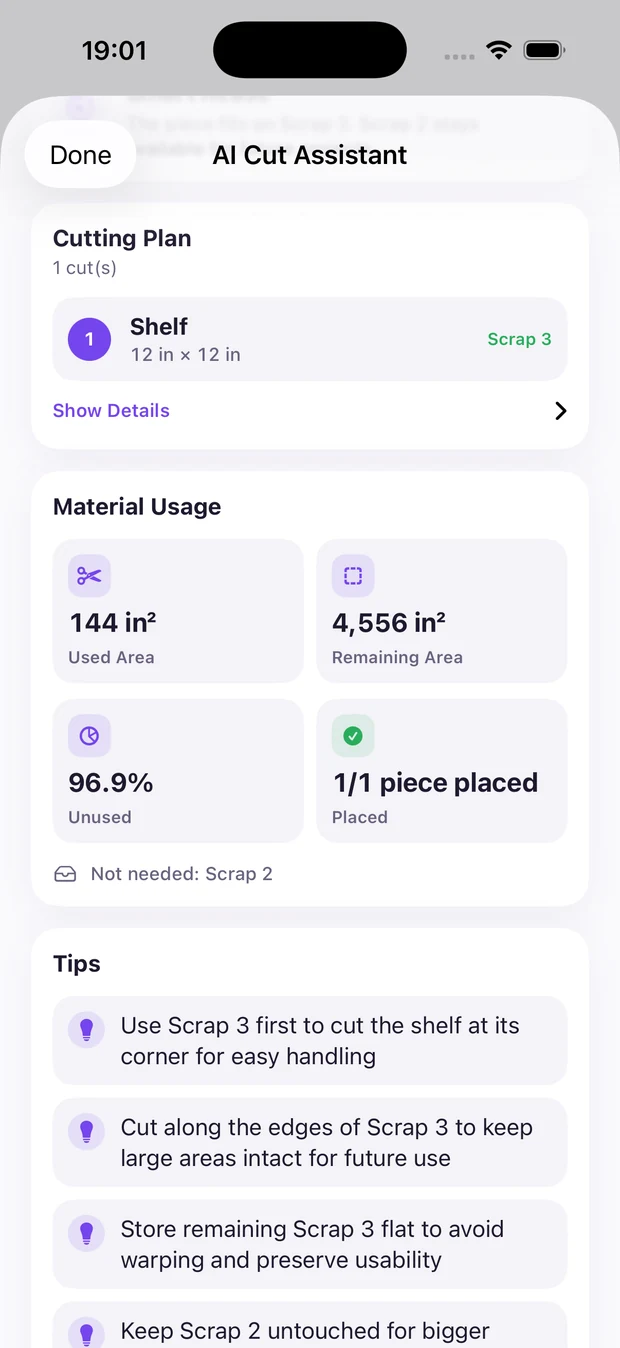
ScrapCut AI Cut Assistant showing a cutting plan, material usage figures and practical cutting tips.

AI Cut Assistant

Let AI Find the Best Scrap

Pick scraps you already saved in Inventory, enter the cuts you need, and ScrapCut returns a clear cutting plan you can take to the saw.

  • Best scrap recommendation

    See which saved piece your cuts should come from — so the right leftover gets used, not the biggest sheet on the pile.

  • Cutting order

    Every cut is numbered in the sequence that keeps the offcut usable and the sheet easy to handle.

  • Verified material usage

    Used area, remaining area and pieces placed come from ScrapCut's own optimizer, which checks the geometry on your device.

  • Practical cutting tips

    Short, plain-language notes on handling, cut placement and storing what's left over.

How it works ScrapCut's optimizer verifies the geometry locally on your iPhone. The AI's job is to explain that verified plan in clear language — it doesn't do the maths.

Reusable Scrap Inventory with three saved sheets, search, filters and an AI Cut Assistant shortcut.

Inventory

Turn Leftovers Into Your Next Project

Every offcut worth keeping goes into Inventory with its real dimensions. Next time you need a piece, ScrapCut looks there first.

  • Save leftover sheets and scraps as you produce them
  • Track width, length and material for every piece
  • Reuse saved scraps in future cut plans
  • Keep large stock intact when a smaller scrap does the job

Keep it. Reuse it. Build with it.

Smart cut optimization

Every Piece Placed, Every Offcut Accounted For

ScrapCut lays your pieces onto the material you selected, then shows exactly what's used and what's still worth keeping.

Cut layout diagram A sheet of material with cut pieces placed in one corner and the remaining usable area marked alongside them. A B C D Remaining — keep for reuse 50 in 30 in
Placed pieces
Remaining material
Cut line

Optimized placement

Pieces are arranged to sit together rather than scattered, so what's left stays in one usable block.

Remaining material & waste

Used area, remaining area and the unused share of the sheet are shown for the plan you just generated.

Your units, your way

Work in inches, centimetres or millimetres and switch whenever it suits the job.

ScrapCut Home screen with reusable scrap count, reuse prompts and a New Cut Plan button.

Save material

Save Material. Save Money. Waste Less.

Most workshops already own the piece they're about to buy. It's just at the bottom of the offcut pile with no record of its size.

  • Check what you already have before ordering new material
  • Cut from a scrap instead of breaking into a full sheet
  • Fewer forgotten offcuts, less material thrown away

ScrapCut Premium

One purchase. Keep ScrapCut Premium.

Unlock the full workflow with a single in-app purchase. No subscription, no ad breaks between you and your cut plan.

Download on the App Store
  • AI cut plans without watching rewarded ads
  • Ad-free throughout the app
  • A faster path from cut list to cutting plan
  • Smart scrap reuse across all your projects

Start with the material you already own

ScrapCut is available on iPhone.

Download on the App Store